I have wanted a digital photo frame to display pictures of my family and friends on my desk for a while now. I recently found a really good deal on a Nextar 3.5” frame and decided to get it. While the 3.5” screen was smaller than I originally wanted, I decided that it was too good of a deal to pass up. Now, I must say, I wish I had! This isn’t to say that there are not positive aspects, just that the negatives outweigh the positives for me.
Pros:
· Price: It was very cheap in comparison to many frames. I was able to get it online for under $30.
· Screen Size: When I first pulled the frame out of the box, I was encouraged. The 3.5” screen appeared bigger than expected and is plenty big for my small desk. A standard 7” screen may be a bit overwhelming.
· Power: The cable allows me to power the frame straight from my computer or I can use the AC – USB adapter to plug into the wall. The 3’ cable is also a nice length to allow me to place the frame anywhere on my desk.
Cons:
· Screen: While I like the size of the screen and it is nice and bright, the quality leaves MUCH to be desired. Photos from my Sony Cyber-Shot H3 look like they were taken with a $2 disposable and scanned in. Whites are completely washed out and darker colors are almost pixilated.
· Software: The software is very restrictive and gives me only two options. Play slideshow or manage images. It would be nice to have a contrast control, which I think might help the image quality.
· Adding images: This process is atrocious. Even though it comes with a USB cable, it is for power ONLY. The only way to get images onto the frame is to insert your memory card and either copy one at a time or everything from the card. This was VERY disappointing because there are many pictures I want to add that are on my computer. To get these on I will have to transfer them to a card then add them to the frame. Talk about a usability nightmare!
· Batteries: While this is not a show stopper for me, many frames offer the option to run on battery power so it doesn’t need to be plugged in at all times.
Bottom Line:
As you can tell and I already stated, I am not the biggest fan of this frame. It has a nice feel and looks good but the terrible image handling and display make it a tough choice. After using it, it certainly seems as cheap as it actually was. Maybe this is a lesson for me to look for a bit more quality and not be mesmerized by a “shiny” price tag.


 Nokia unveiled the latest breed of pocket pc/smart phone with the announcement of the Nokia N97 at Nokia World today. The phone, which is set to come to market summer 2009, combines many of the most desired features of the current heavy hitters. The large beautiful screen promises to provide a seamless touch screen display that allows you to create a mobile computing experience second to none. The inclusion of an onscreen keyboard and a full QWERTY slide out keyboard is sure to please all the typing critiques alike. A first look the N97 looks like it will have a feature set backed by Nokia quality that I think will prove to gain a quality following of users. This is yet another product in the trend of pocket computing. I’m sure this phone will be hyped just as the others were but only time will tell how well it will perform. Stay Tuned…
 After much anticipation over the past several months, it is finally here. I officially updated my Xbox 360 to the New Xbox Experience dashboard at 6:45am this morning. I had little time to play around with it before heading to work but was able to create my avatar and click through the main channels. The avatar creation process was very straightforward and I was able to create an online representative I am happy with. Netflix integration, certainly one of the most exciting new features, was not working when I tried. I got an error message that communication could not be made with the Microsoft servers. I can only assume this is either due to the large number of updates the server was working through or that it was too early in the day. Speaking of Netflix, I read an article yesterday that Sony pictures will not make their content available for the 360. Representatives from Microsoft seemed confident that they would come to a deal but there was no timeline given. I am really looking forward to sitting down and really digging into the new features. I really hope it doesn’t disappoint.
 I have been on the road/in the air quite a bit in the past week and have made a few observations about traveling with a variety of technology tools (computer, cell phone, ipod, etc.).
 Nobody likes charging their electronics. The wires constantly get in our way, they are terrible to keep track of, and can frankly be a pain. This is where wireless charging comes in. In a decade where it seems everything is going wireless (internet, projectors, headphones, microphones, and speakers just to name a few) it is only logical that wireless charging would follow. Through a lot of heavy lifting by a few research institutions, this futuristic thought will become reality for many people soon. The first of these devices to come to market is the
 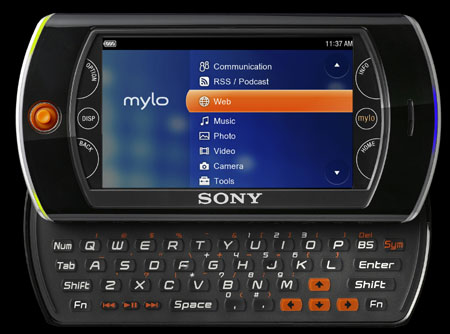 We were at the mall last night so I popped into the Sony Style store while my wife was looking at clothes. While I was there I picked up the Sony Mylo Internet device which is somewhat comparable to the iPod Touch. My initial reaction was very positive. The full keyboard seemed very easy to use and there were many features that were appealing. GPS, microphone, and integrated VOIP support really made me think this might be a viable option as an alternative to my forthcoming iPod Touch. While my time in the Style store was short, I felt it was necessary to do some research to compare the Sony with other devices (primarily the Touch). Since we were there, I also found it necessary to head down to the Apple store. Like always, I played around with the Macbooks and, of course, the iPod Touch. Style wise, I don’t know if the iPhone/Touch can be touched at this moment. I have looked at and handled a variety of touch screen devices and ALWAYS compare them to the iPhone/Touch. They all have great features (and some even do things better) but the entire experience just seems better on the iPhone/Touch. Still, I felt it necessary to show the Mylo my respect and find comparisons online when I got home. After a brief search I found a variety of side by side comparisons. Like I said, the Mylo has several features that make it an appealing product (GPS, microphone, VOIP, full keyboard). However, the lack of substantial built-in memory (only 1gig), music support, expandable apps and user experience I must conclude that I am not sold on the device and will holdout until Christmas for my iPod Touch. I am looking forward to really getting my hands on it and seeing if my opinion changes.
  I read an interesting article from

