 I was exploring some new Microsoft products after attending a webinar earlier this week and came across an interesting tool called Photosynth from Microsoft Live Labs. Photosynth takes photos you take of a person, item or scenery and stitches them together to create a full view 3D object. While this is a neat tool and could be very beneficial to some markets (think education), it is not a practical tool for the everyday user/phototaker. The reason; to get this 3D rendering you have to take MANY pictures of the object. In some of the examples, number of images were well above 100 OF A SINGLE ITEM. Like I said though, this is a specialized tool that isn’t necessarily intended for the standard consumer market. Imagine you are a social studies teacher teaching your students about the Sphinx. Showing students a few images is neat, now imagine being able to take them on a virtual 3D fieldtrip where they can see it from all angles. That is downright cool!
Thursday, October 23, 2008
From Camera to 3D

Thursday, October 16, 2008
Wireless Charging?
 Nobody likes charging their electronics. The wires constantly get in our way, they are terrible to keep track of, and can frankly be a pain. This is where wireless charging comes in. In a decade where it seems everything is going wireless (internet, projectors, headphones, microphones, and speakers just to name a few) it is only logical that wireless charging would follow. Through a lot of heavy lifting by a few research institutions, this futuristic thought will become reality for many people soon. The first of these devices to come to market is the Wildcharge. You simply plug this slab of plastic/metal into the wall and lay your electronic devices on the surface and voila, charging is active. The catch is that you have to buy a special back plate for your devices with probes that transfer the power to your battery. This device, and others of its kind are a stepping stone. The University of Florida has a similar device that functions without the special back plate, certainly a step forward. Now, going even further, MIT is working on true wireless charging device that removed the charging slab altogether. Basically, the device plugs in and transmits the charging signals to all of your specified devices; cell phone, laptop, iPod, etc. (who knows, maybe even toasters and TVs!). Just imagine walking into your house and immediately your devices start charging until they are fully powered! Sign me up!
Tuesday, October 7, 2008
Sony Mylo
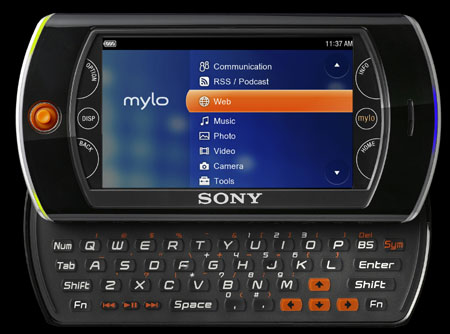 We were at the mall last night so I popped into the Sony Style store while my wife was looking at clothes. While I was there I picked up the Sony Mylo Internet device which is somewhat comparable to the iPod Touch. My initial reaction was very positive. The full keyboard seemed very easy to use and there were many features that were appealing. GPS, microphone, and integrated VOIP support really made me think this might be a viable option as an alternative to my forthcoming iPod Touch. While my time in the Style store was short, I felt it was necessary to do some research to compare the Sony with other devices (primarily the Touch). Since we were there, I also found it necessary to head down to the Apple store. Like always, I played around with the Macbooks and, of course, the iPod Touch. Style wise, I don’t know if the iPhone/Touch can be touched at this moment. I have looked at and handled a variety of touch screen devices and ALWAYS compare them to the iPhone/Touch. They all have great features (and some even do things better) but the entire experience just seems better on the iPhone/Touch. Still, I felt it necessary to show the Mylo my respect and find comparisons online when I got home. After a brief search I found a variety of side by side comparisons. Like I said, the Mylo has several features that make it an appealing product (GPS, microphone, VOIP, full keyboard). However, the lack of substantial built-in memory (only 1gig), music support, expandable apps and user experience I must conclude that I am not sold on the device and will holdout until Christmas for my iPod Touch. I am looking forward to really getting my hands on it and seeing if my opinion changes.
Until next time…
Thursday, October 2, 2008
Multitouch Technology
 I read an interesting article from Wired.com today about the future of multitouch technology (think the finger flicking gestures on the iphone/touch). Manufacturers are trying to figure out how they might use this technology in their knew hardware devices. Part of the conversation would be to add gesture controls to a laptops touchpad for additional controls. This may provide some nice features but I don’t think it will really take off. There isn’t enough direct correlation for people to really get into using the features in that way. Now, I do see potential in the tablet pc market. Multitouch could provide an amazing array of control on these computers where you do touch the screen regularly, making it a natural transition. Of course, multimedia software will probably be the first to jump on the bandwagon giving the user complete control with their fingers. It will certainly take some getting used to, but think about being able to zoom in/out on a Word document without navigating up to the View tab. The possibilities are seemingly endless. Microsoft has already announced that multitouch technology will be built-in to the upcoming Windows 7 (scheduled to replace Vista in 2010). I am excited to keep an eye on this to see where it will evolve!